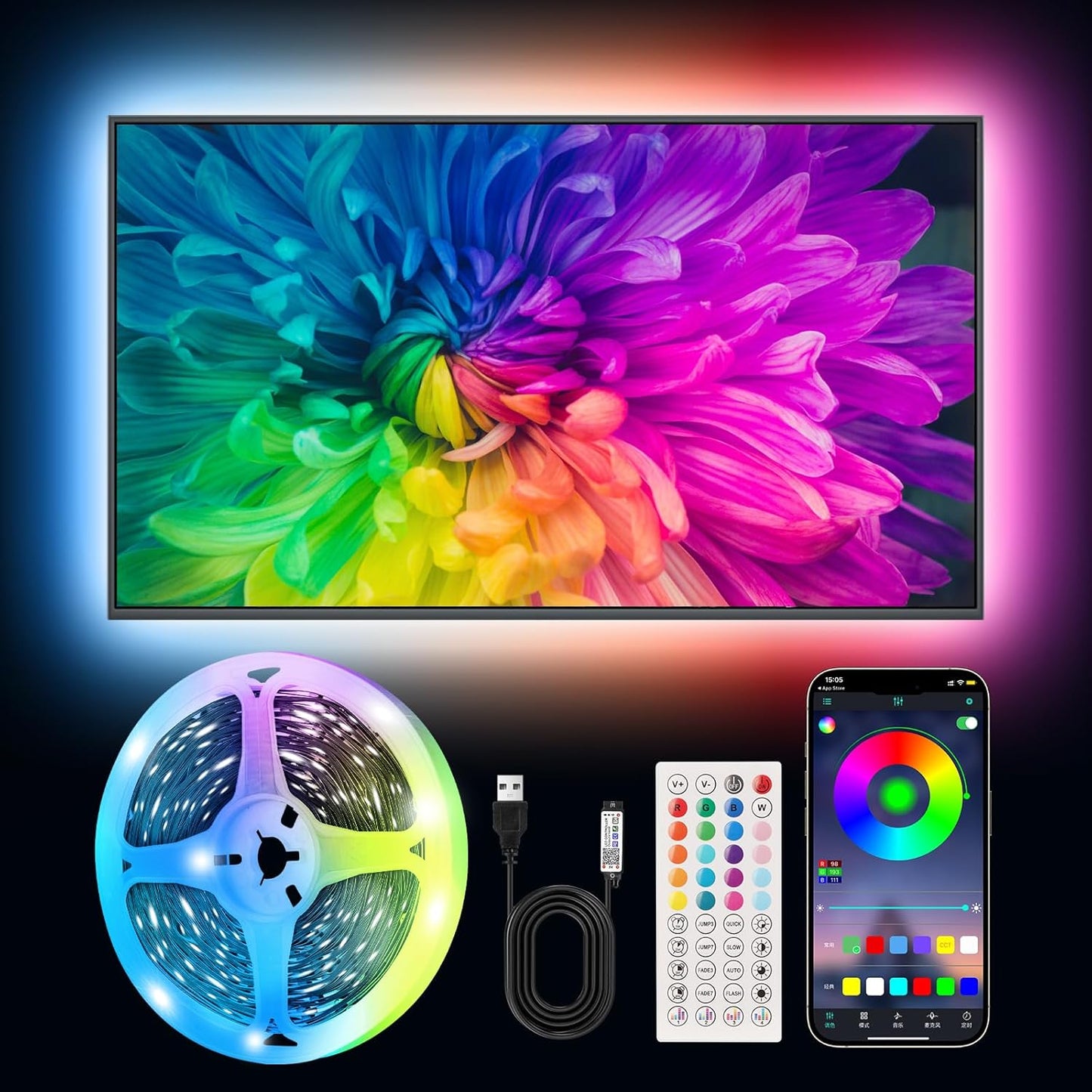
Ailitty AuroraStrip – Home Office Desk Backlight, Bias Lighting for Monitor to Reduce Eye Strain
Ailitty AuroraStrip – Home Office Desk Backlight, Bias Lighting for Monitor to Reduce Eye Strain
Couldn't load pickup availability
Why you'll love it
- Music sync via built-in microphone turns any space into a reactive light show without extra speakers
- 8 size options from 3.28ft to 65ft mean one listing covers everything from a laptop to a full-room install
- 5V USB power supply is ultra-low heat and safe around kids and pets compared to AC-powered strips
- Dual control via Bluetooth app and IR remote gives flexibility without requiring Wi-Fi or a hub
- Peel-and-stick adhesive backing enables tool-free installation in minutes on any clean surface
Perfect for
- Ambient backlighting behind TVs and monitors to reduce eye strain and enhance viewing
- Music-synced party lighting in bedrooms or living rooms
- Gaming setup immersion with reactive color effects
- Bedroom mood lighting and decoration for teens and young adults
- Holiday and occasion decoration (Christmas, birthdays, weddings) with color-changing accents
USB powered LED lights TV lights

Strip lights designed specifically to enhance visual experience
Back of TV LED lights is a multifunctional and vibrant illumination designed to enhance the visual experience of the TV, computer, or bedroom, allowing indirect lighting to illuminate your life and create more colors for your home.
LED strip lights to enhance the home theater experience

With the music rhythm dance with sync your tv backlights
LED lights for behind TV dance with the rhythm of music, synchronizing with your LED TV backlights. The LED lights strip photosensitive sound sensor synchronizes with the rhythm of music to achieve lighting effects. The LED light color will change with the rhythm of sound and music, dancing with the strip lights! You can also choose to turn on or off the light strip at a specific time to create a charming emotional experience.

Creating a smart home
Smart TV LED backlight, APP connection can easily adjust color and brightness, creating smart home LED TV lights, taking convenience to another level, allowing you to easily manage lights from your smartphone or tablet, seamlessly integrated with smart devices.

5V USB power supply, more secure
5V USB power supply, safer LED strip lights with remote control, can also be used as strip lights for bedroom, bringing more fun to your home! It can be safely operated through USB power supply, effortlessly adhering to any smooth surface without damaging it. Whether emphasizing the fashionable design of the TV or creating a comfortable environment in the bedroom, this LED strip light adds a touch of elegance and romance.

Please choose TV lights that suits your TV size.
Different sizes of TVs have different installation methods for TV light strips, please choose the method that suits your TV size, and install according to the following four steps.
TV lights installation steps
1.Clean and keep the back of the TV neat and tidy.
2.Peel off the adhesive backing of the TV LED backlight.
3.Mount the TV LED backlight around the back of the TV.
4.Connect the TV LED backlight to a power source.
Product Information
【Immersive experience of LED strip lights for TV】TV LED has 16 million colors of mood lights, which can create various color atmospheres for different settings. LED for TV are powered by USB and connected to chargers, computers, power adapters, etc; LED TV backlight can continuously create unique scenes and atmospheres according to your preferences. 【Intelligent smart led strip lights timing and music synchronization mode】 The TV LED light has a high sensitivity microphone, and the brightness and color change with the rhythm of sound and music, creating a romantic and relaxed atmosphere; The TV LED strip can be set to automatically turn on and off through the timer function in the application. 【Intelligent control for LED Light for TV】Control the LED lights behind TV through a remote control or application, select colors, change modes, and adjust brightness; Scan and download the application, connect Bluetooth to control the LED backlight TV, the application interface is rich and adjustable. 【Easy installation of LED Strip for TV】High quality LED light strips can provide brighter, more colorful lighting effects and more diverse dynamic change modes. After tearing off the protective paper on the back of the led light strip for tv, you can stick it to any smooth, dry, and clean surface. 【LED strip lights are widely applicable】led strips for tv are suitable for various places such as living rooms, bedrooms, televisions, computers, home theaters, etc. It can also be used as LED strip lights for bedroom. Whether it's holidays or daily decoration, its excellent lighting effects will make your home unique; Ultra low heat 5V USB power supply makes decoration safer.
Features & Specs Indoor Outdoor Usage Indoor Additional Features Adjustable, Color Changing, Dimmable, Remote Controlled, Timer Light Source Type LED Power Source Corded Electric Light Color Multicolor Controller Type App Control, Remote Control Connectivity Protocol Bluetooth Connectivity Technology Bluetooth, Infrared, USB Voltage 5 Volts Wattage 144 watts Control Method App, Remote Water Resistance Level Not Water Resistant Wireless Communication Technology Bluetooth Style Color RGB (Red, Green, Blue) Theme Christmas, Fantasy, Music Occasion Birthday, Christmas, Congratulations, Engagement, Wedding Product Style Modern Seasons Winter Measurements Number of Light Sources 150 Item Weight 0.18 Pounds Number of Items 1
Frequently Asked Questions
Will the lighting actually help me focus, or is it just a distraction?
When set to a soft, static warm white or cool daylight tone at moderate brightness, bias lighting behind your monitor or desk reduces eye strain and creates a calm, consistent visual environment that supports deep work. The key is choosing a steady, low-saturation color and avoiding music sync mode during focus sessions, which is easy to toggle in the app.
Can I schedule it to turn on automatically when I start work?
Yes. The in-app timer function lets you schedule automatic on and off times, so the strip can power on at your morning start time and power off at the end of your workday. It is a great way to anchor a consistent start-of-day focus ritual without thinking about it.
Is the bias lighting good enough to actually reduce eye strain during long screen sessions?
Yes. Bias lighting behind a monitor raises the ambient light level around the screen, which reduces the contrast between the bright display and the dark wall behind it. This lowers pupil strain during long work, coding, or design sessions and is the same principle used in professional video editing suites.
Will the music sync feature interrupt my focus if someone talks in the room?
Music sync is an optional mode that you turn on or off with the remote or app. For deep work, simply leave it on a static color, and the microphone will not react to anything. When you want to take a break or wind down, switch to music sync mode and it comes alive.
Can I use this as my only desk lamp for video calls?
It is not designed to be a primary task light, but it makes an excellent accent and key light supplement. Set it behind your monitor for a soft backlight glow on camera, and pair it with a separate small desk lamp for focused task lighting on documents.
Does the strip flicker, buzz, or cause monitor interference?
No. The Ailitty AuroraStrip uses high-quality constant-current drivers that prevent the visible flicker and high-frequency buzz common in cheap LED strips. It is also shielded against the electromagnetic noise that some poorly designed strips introduce near monitors and audio equipment.
Can I match the lighting to my daily routine, like warm in the morning and cool in the afternoon?
Yes. Save multiple custom scenes in the app, then use the timer to switch between them at scheduled times. Many remote workers set a warm amber tone in the early morning, a cool white during peak focus hours, and a softer warm tone for end-of-day wind-down.
Is the app distracting, or does it stay out of my way once set up?
Once you have your preferred color, brightness, and timer configured, the app does not need to be open or in use. The IR remote gives you one-touch control from across the room, so you can adjust without picking up your phone and breaking your flow state.
How does this compare to a desk lamp for a home office?
A desk lamp is great for illuminating paper documents, but it cannot create the room-filling ambient glow that bias lighting provides. The Ailitty AuroraStrip complements a desk lamp by lighting the wall behind your monitor, which reduces eye strain and makes video calls look noticeably more professional.
Is it better than a smart bulb for a home office?
For a desk setup, a smart bulb lights the ceiling while you stare at a wall. The Ailitty AuroraStrip lights the wall directly behind your monitor, which is where bias lighting actually helps your eyes. It is a more targeted, ergonomic upgrade than a smart bulb in the same room.
How does it compare to a monitor light bar?
Monitor light bars illuminate your desk surface, which is great for reading paper. The Ailitty AuroraStrip does the opposite — it lights the wall behind your monitor to reduce contrast strain. The two products complement each other well, but for the bias lighting benefit, the wall-mounted strip is the more effective solution.
I get headaches from screen glare. Will this actually help?
Many users with light sensitivity report that bias lighting behind the monitor meaningfully reduces headaches during long sessions. By raising the ambient light level around the screen, the strip reduces the harsh contrast that triggers eye fatigue, which is a common headache trigger for desk workers.
Is it bright enough to be useful during the day, or only at night?
It is designed to shine best in lower-light conditions, which is exactly when most people experience the worst eye strain from bright monitors in dim rooms. During the day in a sunny office, set it to a slightly higher brightness and a cool white tone so it still contributes meaningfully to the ambient light around your screen.
Can I use it to mark a clear start and end to my workday when working from home?
Yes. Many remote workers use the timer function as a visual boundary — the strip powers on at 9am to signal the start of the day, then switches to a wind-down color and powers off at 5pm. It is a small but powerful cue that helps separate work mode from personal time when your home is also your office.
Does the Bluetooth app work with my work laptop, or only personal devices?
The app works on any modern iOS or Android device with Bluetooth, including personal phones, work-issued phones, and tablets. Since the strip pairs directly over Bluetooth and does not require a Wi-Fi network, it is a rare smart-home-style accessory that works smoothly on managed work devices.
How do I install the LED strip on my wall or TV?
Clean the surface with isopropyl alcohol, let it dry fully, peel the protective film off the 3M-style adhesive backing, and press the strip firmly into place for 30 seconds. For TV backlighting, start at one corner and follow the back edges of the TV in a U shape. Plug the USB end into any 5V USB power source such as a TV USB port, wall adapter, or power bank, and the strip is ready to pair.
How do I connect the strip to the Bluetooth app?
Download the compatible app on iOS or Android, enable Bluetooth on your phone, and power on the strip. The strip will appear in the device list within a few seconds — tap to pair, and you will have full control over colors, brightness, music mode, scenes, and timer settings.
Can I cut the strip to fit a custom length?
Yes. The strip has clearly marked scissor cut lines at regular intervals along its length. Cut only on these marked points to keep the rest of the strip functional. After cutting, the remaining segment continues to work normally from the USB end.
Does it work with any TV size, from a small monitor to a 75-inch screen?
Yes. The 8 size options from 3.28ft to 65ft cover everything from a single laptop monitor up to a full perimeter install around a 75-inch TV or an entire room. For a typical 55-inch TV, the 13.2ft or 16.4ft option is the most popular pick.
Will it work with my iPhone, iPad, or Android phone?
Yes. The app is compatible with iOS 9.0 and later on iPhone and iPad, and Android 5.0 and later on phones and tablets. Pairing is done over standard Bluetooth, so no Wi-Fi network or smart home hub is required.
What is included in the box?
Each package contains the RGB LED light strip in your selected length, a Bluetooth-compatible control box, an IR remote control with battery included, and a quick-start guide. The only thing you may need to provide is a 5V USB power source, such as a TV USB port or any standard USB wall adapter.
Is the strip safe to leave plugged in 24/7?
Yes. The 5V low-voltage USB operation is designed for continuous use and produces very little heat. Many users leave it plugged in permanently and use the in-app timer or remote to control when it actually lights up, so the strip itself remains safe and energy-efficient around the clock.
How long do the LEDs last, and is there a warranty?
The LEDs are rated for approximately 50,000 hours of use, which translates to well over a decade of typical daily use. Ailitty backs the product with standard warranty support, and the included remote, control box, and strip are all designed for long-term reliability.
What is the difference between an LED strip light and a smart LED bulb?
An LED bulb screws into a lamp and lights a small area from a single point. An LED strip is a flexible ribbon of many small LEDs that you mount along edges, behind furniture, or under cabinets to create ambient washes of light across a large surface. Strips are ideal for backlighting TVs and monitors, accentuating architecture, and creating room-wide mood lighting, while bulbs are better for direct task lighting.