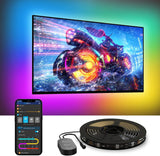
Govee TV LED Backlight – Living Room Ambient Lighting Strip with RGBIC Multi-Zone Color for 55-65 Inch TVs
Govee TV LED Backlight – Living Room Ambient Lighting Strip with RGBIC Multi-Zone Color for 55-65 Inch TVs
Couldn't load pickup availability
Why you'll love it
- RGBIC color segmentation produces multi-zone, vibrant gradients that ordinary single-color RGB strips cannot match
- Bias lighting behind the TV reduces eye fatigue during extended viewing in dim rooms
- Voice control with Alexa and Google Assistant removes the need to reach for the remote or phone
- Built-in microphone music sync turns any TV area into a mini concert or party zone without extra hardware
- 99+ preset scenes and 11 music modes offer one-tap variety for any mood or occasion
- 12.5ft length with included cable clips delivers a clean, snug 4-side install on 55-65 inch TVs
Perfect for
- bias lighting behind a 55-65 inch TV to reduce eye strain during long movie nights
- immersive ambient lighting for gaming sessions that react to on-screen action and music
- party and entertainment lighting synced to music via the built-in microphone
- hands-free mood lighting controlled by Alexa or Google Assistant voice commands
- holiday and seasonal room decor using the 99+ preset scene modes
Frequently Asked Questions
Will the Govee TV LED backlight actually make my living room look more stylish, or is it just a gimmick?
The RGBIC technology paints your wall with multi-zone color gradients, so the effect is a real ambient glow behind your TV rather than a single flat color. Most buyers say it instantly upgrades the room's vibe and becomes a conversation piece, especially in dim evening lighting.
Does the strip light blend in with modern, minimalist, or boho decor?
Yes. The 12.5ft strip hides behind the TV, so the only thing visible is the light on the wall, which you can tune warm and cozy for boho spaces or cool and clean for minimalist rooms. It adds ambiance without adding visual clutter to your design.
Can I match the lighting to my existing room color scheme?
Absolutely. Through the Govee Home app you can dial in millions of colors, so you can coordinate the backlight with your throw pillows, art, or accent wall. You can also save your favorite looks as custom scenes for one-tap recall.
Will it look cheap, or does it feel like a designer-grade upgrade?
Buyers consistently say it looks far more premium than the price suggests. The zone-by-zone color blending and the snug 4-side fit on 55-65 inch TVs give a clean, custom-installed look that feels closer to a high-end media room setup.
Is this a good way to make a rental apartment feel more like home?
It's one of the best renter-friendly upgrades because the LED strip mounts with adhesive and removable cable clips, leaves no marks, and transforms the most-used wall in the room. You get a designer-style glow without drilling, painting, or permanent changes.
I'm decorating a small living room, will this make the space feel bigger or smaller?
It generally makes the space feel larger and more open. Bias lighting behind the TV creates a sense of depth on the wall, and softer ambient colors in the evening make a small room feel more expansive than harsh overhead lighting.
Can I use it as my main source of mood lighting for movie nights?
Many users do exactly that. The 99+ preset scenes let you set a warm cinema glow, a cool starlit effect, or a colorful party mode, and the 12V 18W output is bright enough to fill the wall behind a 55-65 inch TV with rich color.
How does it compare to traditional LED strip lights from a hardware store?
Standard single-color RGB strips only show one color at a time across the entire strip. This Govee strip uses RGBIC zone control so multiple colors flow along the same strip, plus you get app control, music sync, and smart home integration that basic strips lack.
Is it worth it compared to a more expensive smart lamp or floor light?
For TV-area ambiance specifically, yes. A lamp lights one corner of the room, while a backlight creates a wall-sized halo effect that frames the entire screen. At this price point it delivers a bigger visual impact per dollar than most smart lamps.
Will the adhesive damage my wall or TV when I remove it?
The included adhesive and cable clips are designed to peel off cleanly from most painted walls and the back of TVs. If you ever redecorate or move, you can remove the strip without heavy residue on standard surfaces.
I'm worried it will look too 'gamer' or tacky in a grown-up living room, can I tone it down?
You have full control. Stick to the warm whites, ambers, and soft pastels in the app and skip the rainbow presets, and the effect reads as sophisticated accent lighting rather than a gaming setup. Most of the scene library leans elegant rather than loud.
Does the strip stay hidden, or will I see wires and the strip itself?
Once installed on the back of a 55-65 inch TV, the strip itself is completely hidden from view. The included cable clips keep the wiring flush and tidy, and the only thing anyone sees is the soft glow on the wall.
How do I install the Govee TV LED backlight on my TV?
Clean the back edges of your TV, peel the adhesive backing off the strip, and press it into place along the four edges of the screen starting from the bottom corner where the control box sits. Use the included cable clips to secure any excess length and the corner connectors for clean 90-degree bends. The whole process usually takes 10-15 minutes.
How do I connect the strip to the Govee Home app?
Download the Govee Home app, create an account if needed, tap the plus icon to add a device, and select the TV backlight model. Make sure your phone is on 2.4GHz Wi-Fi (not 5GHz) when pairing, and the strip will appear in your device list within a minute or two.
How do I use Alexa or Google Assistant to control the lights?
In the Govee Home app, open the device settings and enable the Alexa or Google Assistant skill, then link your Govee account. Once linked, you can say things like 'Alexa, turn the TV backlight to blue' or 'Hey Google, dim the living room strip to 30 percent'.
Will this strip fit my 70 inch or larger TV?
It is designed and length-optimized for 55-65 inch TVs. On larger screens you may have partial coverage on the sides, so for 70 inch and up you would want a longer LED strip or to verify the measurement before installing.
Does it work with Apple HomeKit or Samsung SmartThings?
It works with Alexa and Google Assistant natively, and through those platforms you can often include it in broader smart home routines. Native HomeKit and SmartThings support is limited, so check the latest Govee documentation if those ecosystems are critical to your setup.
What comes in the box, and do I need to buy anything extra?
Inside the box you'll find the 12.5ft RGBIC LED strip, the control box, the 12V DC adapter, corner connectors, cable clips, and a quick-start guide. You don't need to buy anything else to get it running, though you will want a smartphone with the Govee Home app for full control.
Is the LED strip safe to leave on all night?
Yes. It runs on a low-voltage 12V DC adapter, stays cool, and is designed for extended use. Many people leave it on a dim warm scene overnight as a night light, though for energy savings you can set a sleep timer in the app to have it turn off automatically.
What happens if one section of the strip stops working?
First, reseat the corner connectors and check that the control box is firmly plugged in. If a specific zone is dark or flickering, contact Govee customer support with your order details, as the strip is covered by a manufacturer warranty for defects.
What is the difference between RGB, RGBIC, and RGBW LED strips?
Standard RGB strips can only show one color at a time across the entire strip. RGBW adds a dedicated white channel for cleaner whites. RGBIC, which is what this Govee strip uses, adds an independent control chip so multiple colors can flow along the same strip at the same time, creating those signature gradient effects you see in the product photos.